Find your EnGenius Service 1300 725 323
 
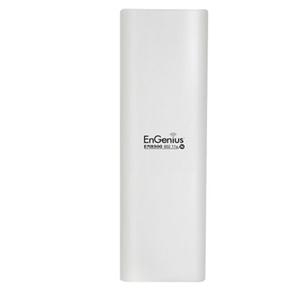
ENH500
Wireless-N Long Range Outdoor AP/CB
05-12-2012 Rev:10-02-2014

Enable Wireless Function via Zone Controller

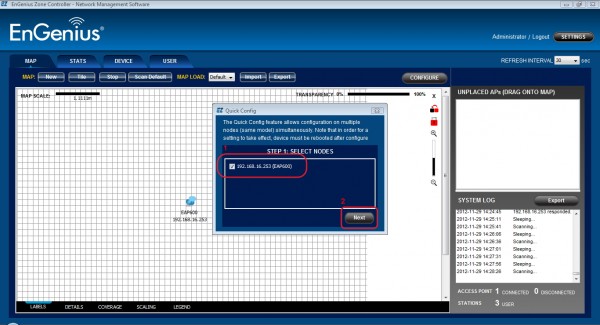
Step1.
1. select target device
2. click the Next button


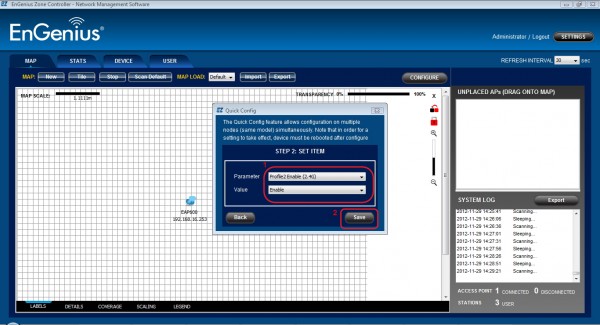
Step2.
1. select target profile
2. select Enable option in the Value pull-down list


Step3.
click the Yes button to confirm the configurations


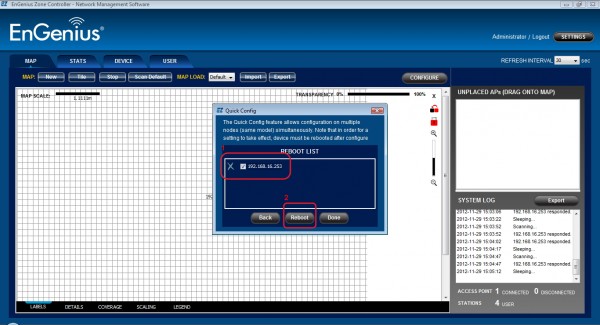
Step4.
1. select the target device
2. click the Reboot button

Step5.

click the Yes button to continue rebooting process

More Support Topic
- Installation guide 11-03-2013 Read
- ZoneController3.8.1 quick guide 13-07-2015 Read
- Enable Wireless Function via Zone Controller 10-02-2014 Read
- How to config as Client Bridge. 17-02-2014 Read
- How to do config WDS Bridge Mode 17-02-2014 Read
- WDS Bridge Mode Setting (Details) 07-10-2014 Read
Talk to us to find out more support information on 1300 725 323.
Copyright © 2011 EnGenius Data Communication Australia | Privacy Policy